Git Log Formats: Customize Your History Output
git log is Git's window into history, but its default output can be verbose and hard to scan. Custom formats, filters, and graph views turn it into a precise reporting tool. This guide covers the format placeholders and filters you'll actually use day to day.
The Oneline and Graph Views
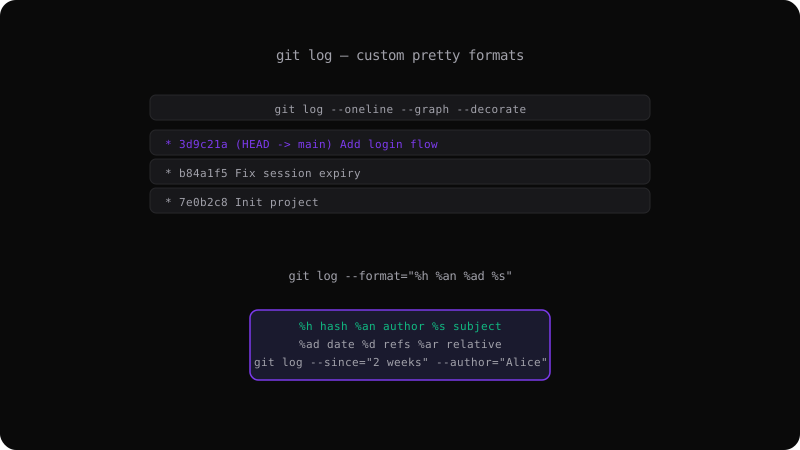
The most common way developers reduce git log verbosity is --oneline, which shows each commit on a single line:
git log --oneline
# 3d9c21a Add login flow
# b84a1f5 Fix session expiry
# 7e0b2c8 Init project
Add --graph --decorate to visualize branch topology and show where refs (branches, tags, HEAD) point:
git log --oneline --graph --decorate --all
This produces the familiar ASCII branch graph that shows how commits relate to each other and where your branches are — invaluable for understanding a repository's shape before merging or rebasing.
Custom Pretty Formats with Placeholders
For full control, use --format with % placeholders. Each placeholder is replaced with a piece of commit data:
git log --format="%h %an %ad %s" --date=short
# 3d9c21a Alice 2026-08-18 Add login flow
# b84a1f5 Bob   2026-08-12 Fix session expiry
The placeholders you'll use most
| Placeholder | Meaning |
|-------------|---------|
| %h / %H | Abbreviated / full commit hash |
| %an | Author name |
| %ae | Author email |
| %s | Subject (first line of the message) |
| %b | Body (rest of the message) |
| %d | Refs (branch/tag names) |
| %ad | Author date (format with --date=) |
| %ar | Author date, relative ("2 weeks ago") |
| %cd / %cr | Commit date / relative commit date |
| %n | Newline |
| %% | A literal percent sign |
Build a compact, readable summary
A popular format combines subject, hash, and refs:
git log --format="%h %d %s" --decorate --oneline
To show the author and relative date so you can see who did what recently:
git log --format="%h %an %ar: %s"
# b84a1f5 Bob 3 days ago: Fix session expiry
Save a format as an alias
Typing a long format repeatedly is error-prone. Save it as a Git alias so it's one short command:
git config --global alias.lg "log --oneline --graph --decorate --all"
git config --global alias.mine "log --author=you@example.com --oneline"
Now git lg and git mine work anywhere. You can also define the format inside the alias:
git config --global alias.pretty "log --pretty=format:'%h %ad %s' --date=short"
Filtering Commit History
git log accepts many filters to narrow down exactly the commits you care about.
By file
Show only commits that touched a path:
git log -- src/index.ts
git log --oneline -- README.md
By author
git log --author="Alice"
git log --author="alice@example.com"
Author filtering matches as a regular expression against the name or email, so a first name works to match an author.
By date range
git log --since="2 weeks ago"
git log --since="2026-01-01" --until="2026-06-01"
Relative dates like 2 weeks ago, yesterday, and 14 days are supported, as well as absolute YYYY-MM-DD values.
By commit content
git log --grep="fix login"          # commits whose message matches
git log -S"function render()"       # commits that changed the number of occurrences
git log -G"pattern.*regex"          # commits whose diff matches a regex
The -S (pickaxe) option is powerful: it shows commits that added or removed a specific string, which is very useful for tracking when a function or config value was introduced or removed.
By quantity and range
git log -n 5                         # last 5 commits
git log HEAD~3..HEAD                 # commits since 3 before HEAD
git log main..feature                # commits on feature not on main
git log --no-merges                  # exclude merge commits
git log --all                       # all branches, not just the current one
Skip Files and Whitespace Noise
Two options help when a commit is dominated by something you don't care about:
git log --follow -- src/app.ts                   # follow a renamed file
git log -w                                        # ignore whitespace-only changes
git log --diff-filter=M                           # only commits that modified files
Generating a Changelog
Because git shortlog groups commits by author, it is often combined with git log-style range syntax to produce release notes:
git shortlog -sn v1.0.0..HEAD
This lists every contributor and how many commits they made since the v1.0.0 tag — a quick, human-readable changelog.
Custom formats take a little setup, but they pay off every single day. Define a couple of aliases that match how you want to read history, and git log becomes one of the fastest ways to understand a repository. See the <a href="/commands/git-log">git log reference</a> for the full command breakdown.