Git Hooks: Automate Your Development Workflow
What Are Git Hooks?
Git hooks are scripts that run automatically at specific points in Git's lifecycle. They live in the .git/hooks directory and let you enforce policies, run checks, or trigger actions before or after Git commands execute.
Common use cases:
- Run linters and formatters before every commit
- Run tests before every push
- Enforce commit message conventions
- Auto-generate documentation
- Block pushes to protected branches
Client-Side Hooks
pre-commit — Run Before Each Commit
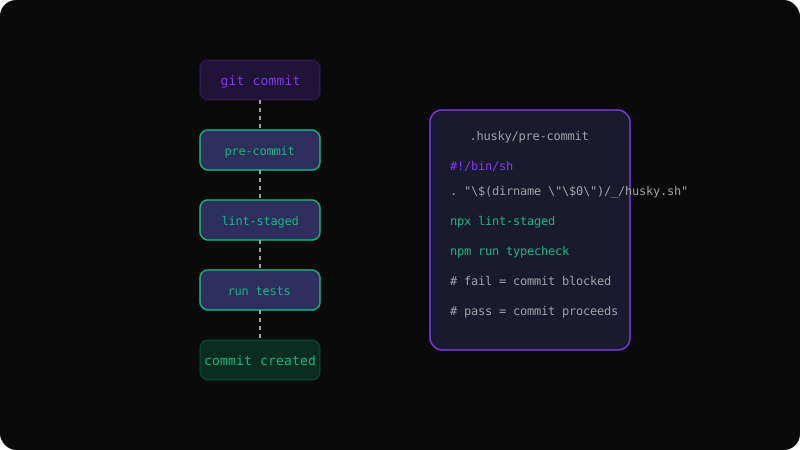
The most popular hook. It runs before Git records the commit. If it exits with a non-zero status, the commit is aborted.
#!/bin/sh
# .git/hooks/pre-commit
npm run lint
npm run typecheck
pre-push — Run Before Pushing
Run your full test suite before code leaves your machine:
#!/bin/sh
# .git/hooks/pre-push
npm run test
npm run build
commit-msg — Validate Commit Messages
Enforce conventional commits:
#!/bin/sh
# .git/hooks/commit-msg
if ! head -1 "$1" | grep -qE "^(feat|fix|docs|chore|refactor|test)\(?.+\)?: .{1,50}$"; then
  echo "Commit message must follow Conventional Commits format"
  exit 1
fiUsing Husky for Team Management
Since .git/hooks is not committed to the repository, use Husky to share hooks with your team:
npm install husky --save-dev
npx husky init
Then create hooks in the .husky/ directory:
# .husky/pre-commit
npx lint-staged

# .husky/pre-push
npm run test
These hooks are committed to the repository, so every developer gets them when they git clone and run npm install.
Server-Side Hooks
Git servers can also run hooks. The most useful is pre-receive, which runs on the server before accepting pushed data:
#!/bin/bash
# This prevents force-pushes to main
while read oldrev newrev refname; do
  if [ "$refname" = "refs/heads/main" ]; then
    echo "Force-pushing to main is not allowed"
    exit 1
  fi
doneBest Practices
- Keep hooks fast — slow hooks frustrate the team. Move heavy checks to CI.
- Provide skip mechanisms — support
--no-verifyfor emergencies. - Fail gracefully — show clear error messages so developers know what to fix.
- Version your hooks — commit them to the repository via Husky or a hooks directory.
Git hooks are the simplest way to catch issues before they reach your repository. Combine them with CI for defense in depth.
Get the Offline Git Field Guide
The 97-page PDF + ePub course — $9. Read this command, offline.